


Новое поступление

Sricam SP009B 720P CCTV Camera IP Wireless 1.0 Megapixel 6 IR Leds IR-CUT Night Vision Home Security Remote Cam | Безопасность и

Oiiwak WiFi Endoscope Camera 5.0MP Wireless Borescope 1944P 6X Zoomable IP67 Snake Inspection for Android iOS | Безопасность и
5 694,34 руб.

Подводная камера для рыбалки 20 м WiFi визуальное рыболовное устройство
2 452,28 - 6 932,24 руб.

Сетевой видеорегистратор Dahua IPC-HFW5442T-SE 4MP Pro AI пуля ИК сети IP Камера H.265 & H.264
21 434,24 руб.

2018 Wifi Ip камера Hd Cctv видео беспроводные сетевые камеры для домашней безопасности

2014 специальное предложение две лампы цилиндрическая камера 800tvl cctv наружная
5 259,84 руб.

Auto Focus 3X Motorized Lens 2.8-8mm H.265/264 IP Camera HI3516D SONY Starvis IMX290 2MP Dome CCTV Indoor POE Optional | Безопасность и

Techage Smart-Security Store
Магазина Techage Smart-Security Store работает с 24.03.2013. его рейтинг составлет 92.1 баллов из 100. В избранное добавили 330644 покупателя. Средний рейтинг торваров продавца 4.7 в продаже представленно 173 наименований товаров, успешно доставлено 16325 заказов. 3165 покупателей оставили отзывы о продавце.
Характеристики
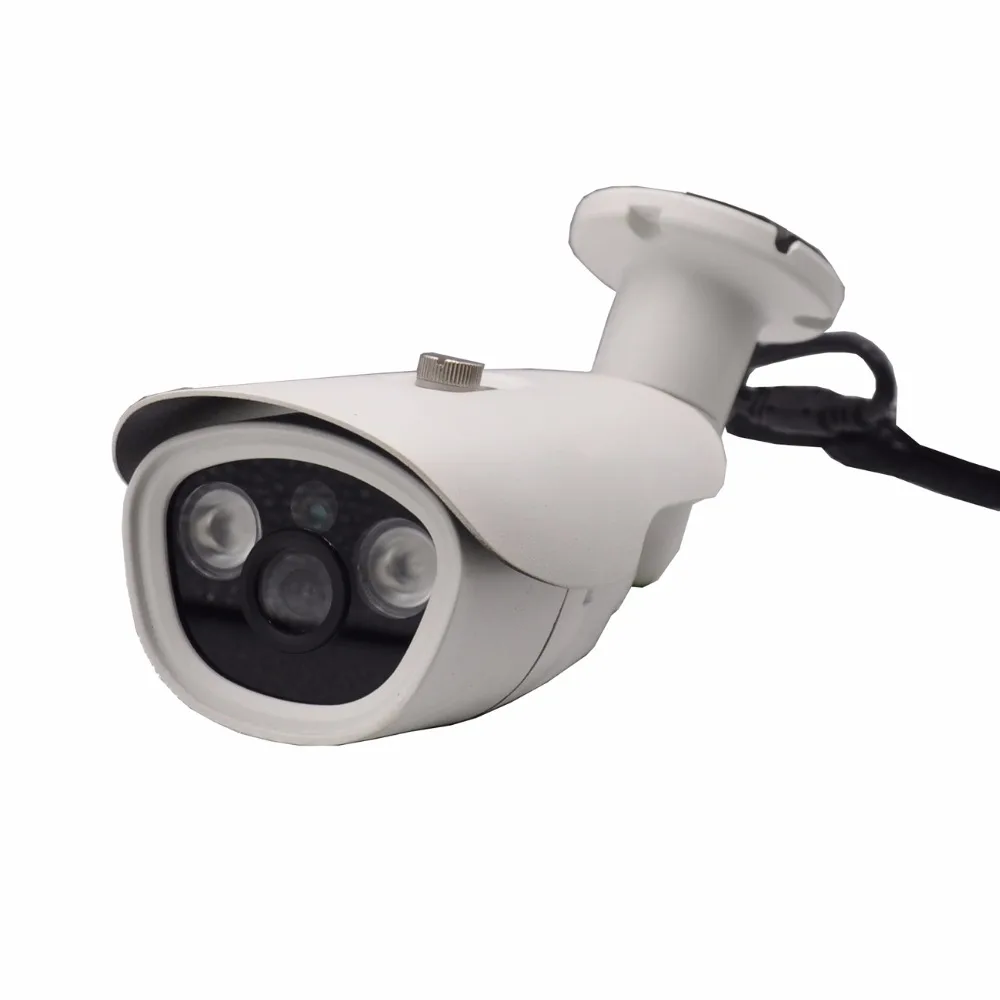
Wireless 720P IP Camera Metal Outdoor Waterproof 1.0mp Wifi IR CUT Nignt Vision 1280*720P with TF Card Slot CCTV | Безопасность и
История изменения цены
*Текущая стоимость уже могла изменится. Что бы узнать актуальную цену и проверить наличие товара, нажмите "Добавить в корзину"
| Месяц | Минимальная цена | Макс. стоимость | Цена |
|---|---|---|---|
| Mar-18-2026 | 0.46 руб. | 0.85 руб. | 0 руб. |
| Feb-18-2026 | 0.13 руб. | 0.14 руб. | 0 руб. |
| Jan-18-2026 | 0.70 руб. | 0.47 руб. | 0 руб. |
| Dec-18-2025 | 0.11 руб. | 0.49 руб. | 0 руб. |
| Nov-18-2025 | 0.5 руб. | 0.63 руб. | 0 руб. |
| Oct-18-2025 | 0.94 руб. | 0.5 руб. | 0 руб. |
| Sep-18-2025 | 0.39 руб. | 0.33 руб. | 0 руб. |
| Aug-18-2025 | 0.88 руб. | 0.81 руб. | 0 руб. |
| Jul-18-2025 | 0.78 руб. | 0.30 руб. | 0 руб. |
Описание товара


Box Contain: 1x 720P IR HD IP WIFI camera (Not included TF Card) With 12V 2A adapter Or Not
1x User manual
You Maybe Need follow items!!!!
Features:
Supports Both Wi-Fi and Wired Mode !
Support Micro SD card,up to 64GB;
Support ONVIF,can work with Third Party NVR .
Support for mobile video surveillance(iOS,android) : Yoosee
Support Motion Detection.


Onvif


| Model | JW-IPC-Q5W | |
| Item | Bullet WIFI HD IP Camera | |
| Device Type | 1.0Megapixel CMOS sensor | |
| Size | 1/4 inch | |
| Effective Pixels | 1.0MP:1280*720 D1:640*480 CIF:320*240 |
|
| B/W | Yes | |
| Min.Scene Illumination | Color | 0.5LUX(IR ON) |
| IR sensitivity | Yes | |
| IR-CUT | Yes | |
| Lens | Lens | Standard 3.6mm ,2.8/6mm are available |
| System | operating system | Embedded LINUX Operating System |
| Day/Nigh | IR distance | 5-20M |
| Video | Video Quality | VGA@ 25 fps |
| Functions | Grab function | YES |
| Motion Detection | Yes | |
| Video Conpression | Compression | H.264 |
| Picture Resolution | 1.0MP:1280*720@25FPS D1:640*480@25FPS | |
| CIF:320*240@25FPS | ||
| Recording Management | Video mode | Manual recording, motion detection recording, time recording, alarm recording |
| Recordings save | TF card(NOT Included) | |
| Audio | Compression | G.711A |
| Audio Output | NO | |
| Audio Input | NO | |
| Network | Ethernet | Ethernet (10/100 Base-T),RJ-45 connector |
| Wireless LAN | IEEE802.11n Standard | |
| Alarm | Alarm triggered | Speaker alarm, alarm recording, capture, send Email |
| Alarm Input | ||
| Physical properties | Temperature | -10°C~+55°C |
| Humidity | 0%-90% | |
| Power Consumption | 6W-7W | |

Please note: 5G Network WIFI Not Supported!!!!

3 ways to get "Yoosee" app
1),IOS user can download and install "Yoosee" in Apple official shop
2),Android user can enter website:" yoosee.co", download and install "Yoosee"
3),Also can input "yoosee.com" in the exploer to download it in PC, Android version and IOS version can scan the QR core to download the software directly, PC click CMS to download directly.
Here is the setting steps: (At first setting, please put camera and phone near wifi Router)
1, Download Yoosee app and register your account 2, Power on the camera, and set up camera near by your router, wait to hear the IR cut turn on, you can hear the sound: KA KA KA. When you hear this sound, then use a thin sticker to press the reset hole at the back of camera. 3, With 5-10second press reset hole, then you can hear a sound, big sound, that means the camera reset successfully. 4, After resetting, please wait to hear the sound from camera: DI DI DI . then you can start connection from camera. 5, Click smartlink at the right top of the app + this button, and then add the camera ID and the password is 123, aslo choose your wifi and write your wifi password, then the setting can be done.
Set in WIFI mode


1,Download software to PC
1) input download link in the PC explorer ,click the iconto download directly.
2,log account in PC
A,Use the ID( email/phone number/Yoosee account ID) that register in mobile phone to login directly, no need to register
again. The account is:admin password:00000000.
3,Computer terminal network connection (the same as mobile phone software operation three "
4,Add device to PC.
How to add device to the device list?In fact, there are many kinds of ways to achieve,specific methods, please refer to:1):In the left side of the "CMS" software interface, click the button, click ok:
5,Device monitor in PC.
Open CMS software,click device name,start monitor,as the following picture:
CMS


| Dear buyer.here are some important information about this camera.Please read it before you place order . | ||||||||||||
| Q1: What are the advantages of this WiFi camera ? | ||||||||||||
| A: This camera with LAN port and you can connect it with your router when there is no WiFi ; | ||||||||||||
| Q2: I need use EU/AU/US/UK power adapter on my country. Will you provide it to me ? | ||||||||||||
| A : our camera not included adapter,you can order it together | ||||||||||||
| Q3: How about the Network Function .does it support WiFi ? | ||||||||||||
| A1: This camera can only work with 2.4GHz Wifi network,so please check your wifi network before placing order.The WiFi distance depends on signal strength of your Wifi network.Please modify your wifi network name if it's very long or with some symbols,as it may cause the camera connection failure. If your Wifi network is not 2.4GHz,Please connect the camera to your router through LAN cable. |
||||||||||||
| A2: If you failed to use the smartlink to connect your camera to your WiFi.Please try to connect your camera to your router through Lan cable,then set 'Network settings' - 'WiFi' . choose your WiFi network and input WiFi password ; | ||||||||||||
| Q4: I need safety and also my families . Does it provide alarm for us ? | ||||||||||||
| A1: This camera with motion detection function.It can Buzzer/pop alarm message/push email when detect motion action. | ||||||||||||
| Q5: I care about Real time video review of the camera .is it HD and clear ?Is it useful at night ? | ||||||||||||
| A1: You can review the live video through iPhone/Android mobile phones/Windows PC .and there are 3 modes (HD-720P/SD-480P/LD-320P mode) for option. | ||||||||||||
| A2: The camera work day&night.The video is color in daytime,black&white at night.IR distance is about 10meters. | ||||||||||||
| A3: The camera support desk/wall/ceilling installation.You can reverse the image according your installation way.Video formwat support PAL and NTSC. | ||||||||||||
| Q6: How about the View angle. | ||||||||||||
| A1: The camera lens is 3.6mm and view angle is about 70 degrees; | ||||||||||||
| Q7: I hope I can record with this camera .Do I need a memory card ? how dose it work ? | ||||||||||||
| A1: Before recording .You need insert a memory card.it support 64Gb MAX . | ||||||||||||
| A2: The record need about 2Gb/day .it means you need a 64Gb memory card if you want to record for a month .And you it support circle recording | ||||||||||||
| A3: It supports 3 record mode :Manual Recording/Alarm Recording/Scheduled Recording . | ||||||||||||
| Manual Recording : the recording will start/stop according you turn on/off the record switch. | ||||||||||||
| Alarm Recording : the recording will start once the alarm is triggered,and you can set record 1/2/3 minutes. | ||||||||||||
| Scheduled Recording :you can set a time period that record. | ||||||||||||
| A4: It record on SD mode .and auto circulate record is available . Every video file is 30 minutes max (about 250 Mb). it support a memory card 64Gb MAX .Please format your memory card at your first time recording. |
||||||||||||
| A5: The video record can playback directly on your mobile APP. | ||||||||||||
| Q8: I don't want hacker view my camera .I need Safety. Will it work? | ||||||||||||
| A1: The default password is 123.For your security,please modify your camera password as soon as you connect your camera to your network. | ||||||||||||
| A2: If someone want to connect your camera but you don't want to give more permission to him.you can set a Guest Password . he can just view and talk through camera and can't set it . | ||||||||||||
| Q9: How about installing this camera .is it easy? | ||||||||||||
| A : we provide a plastic camera bracket and some screws for it .you can install it on the wall or ceiling .of cause .you can just put it on your table to use it .Just reverse the image on your APP if it's upside-down . |
NOT Support 5G WIFI and AP router.
3 ways to get "Yoosee" app
1),IOS user can download and install "Yoosee" in Apple official shop
2),Android user can enter website:" yoosee.co", download and install "Yoosee"
3),Also can input "yoosee.com" in the exploer to download it in PC, Android version and IOS version can scan the QR core to download the software directly, PC click CMS to download directly.


The software operation in PC
1,Download software to PC
1) input download link in the PC explorer ,click the iconto download directly.
2,log account in PC
A,Use the ID( email/phone number/Yoosee account ID) that register in mobile phone to login directly, no need to register again. The account is:admin password:00000000.
3,Computer terminal network connection (the same as mobile phone software operation three "
4,Add device to PC.
How to add device to the device list?In fact, there are many kinds of ways to achieve,specific methods, please refer to:1):In the left side of the "CMS" software interface, click the button, click ok:
5,Device monitor in PC.
Open CMS software,click device name,start monitor,as the following picture:


Our customer service and tech support will do our best to help you out.

We appreciated all our suctomers to post a positive feedback and 5 scores DSR
We strive to earn 100% perfect”5-stars”scores from you.
The star-scores are very important to us.
If anything about your transaction did not meet your expectations
Please let us know and give us opportunity to make things right.
Posting negative feeback before giving us the opportunity to repair or replace the item willl result in void of warranty.
Any negative feedback or dispute before communication is not welcomed.
- FREE SHIPPING
- Charge SHIPPING
- Charge remote area fee
The destination is diagnosed as remote area,we have following solutions.
If buyer insist original place,buyer will be responsible for the remote fee.(Usual for 20usd)
if buyer can replace original place to another one,which can't be remote area it don't need pay the extra remote fee.
if buyer can allow us ship out another shipping way.

- Warranty
Our store warrants this product and parts against defects in material for a period of an half year from the date of original purchase.Warranty does not cover service or replacements made necessary by any external cause including without limitation, rust, corrosion, lightning, fire, theft, acts of nature, negligence, misuse, abuse, alteration, installation, delivery, unauthorized repairs, power failure or shortage. During this period, we will repair or replace a defective productor part with a new or refurbished item. The user is responsible for all transportation and insurance charges for the product to the our facility
- Return Policy
Products may be returned for refund or replacement within 30 days of the purchase date. Returned merchandise must be unused, in original packaging and include all accessories. Shipping costs are non-refundable.
DVR and Cameras may be returned for repair up to 1 year from the purchase date. Repairs will be processed through the manufacturer, we will assist in the repair procedure in any way we can to expedite the process.
Prior to any return, a Return Merchandise Authorization (RMA) must be obtained by contacting the seller. Any products returned to us without an RMA will be sent back to the buyer at his/her expense. The buyer is responsible for the cost of returning any merchandise.
We will employ every resource to ensure that your return is processed promptly and without hassle. Please contact us for any product or service issues before opening a dispute on Aliexpress
![X5A{VRYK(C]5NK(_S6~Z0]G](http://ae01.alicdn.com/kf/HTB1y9fWMVXXXXXbXVXXq6xXFXXXm/201652880/HTB1y9fWMVXXXXXbXVXXq6xXFXXXm.jpg?size=176267&height=881&width=1000&hash=90fab18879435348390a55691ad84b6c)
Смотрите так же другие товары: